

From Fashion Design Education to Industry-Ready Digital Fashion
How Digital Tools, AI, Technical Drawings, Patterns and Production Workflows Are Transforming Fashion Careers
You Already Know Fashion. But Can You Communicate It Digitally?
Fashion education has traditionally focused on developing a designer's creative foundation. Students learn fashion fundamentals, fabrics, silhouettes, colour theory, garment construction, pattern making, illustration and design concepts. They create moodboards, sketches and collections. These skills remain important.
But there is another question that becomes increasingly important when a student enters the professional fashion industry:
A fashion designer may imagine a beautiful garment. But the industry needs much more than the idea.
- A textile designer may need a repeatable print
- A technical designer may need an accurate technical flat
- A production team may need specifications
- A pattern department may need a digital pattern
- A merchandising team may need colourways and presentations
- A sampling team may need construction information
- A printing unit may need production-ready artwork
- A CAD department may need pattern files
- A factory may need graded patterns and markers
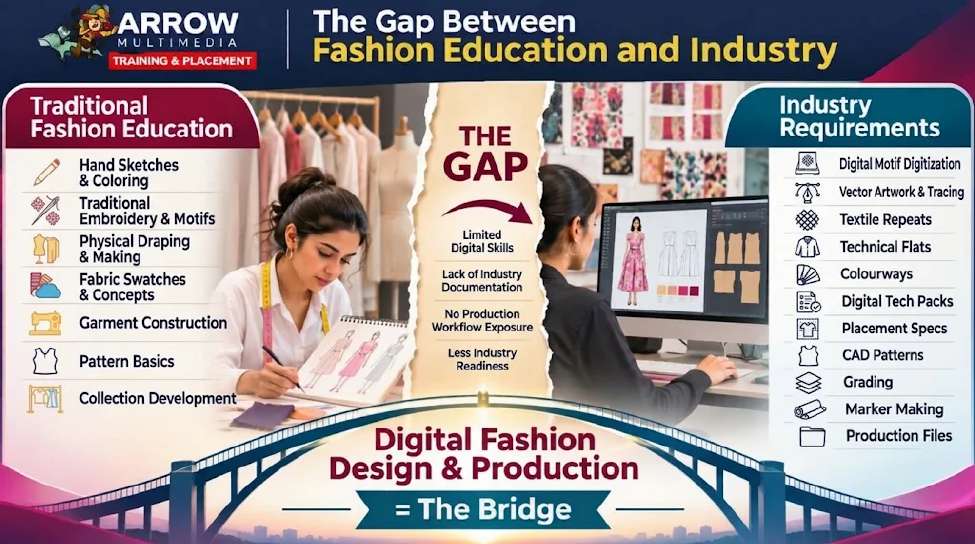
This is where a significant gap can exist between traditional fashion education and modern digital fashion workflows. The purpose of digital fashion education is not to replace traditional fashion knowledge. It is to connect traditional fashion knowledge with the digital language of the industry.
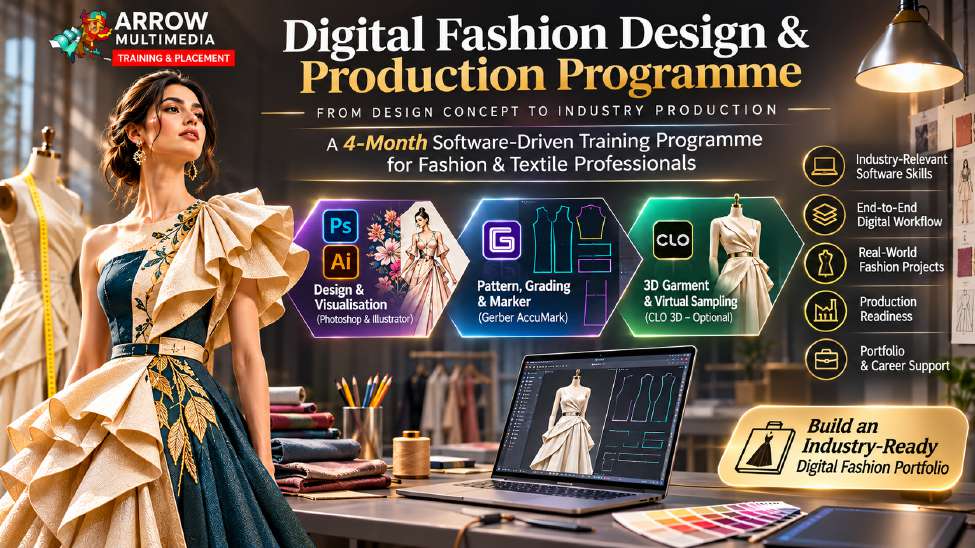
That is the purpose behind the Digital Fashion Design & Production program at Arrow Multimedia.
You already know Fashion. We teach you how to take it Digital.
The Gap Between Fashion Education and Industry
A student may complete a fashion designing course with good knowledge of fashion concepts. They may know:
- How garments are designed
- How fabrics behave
- Different garment categories
- Colour combinations
- Silhouettes
- Basic pattern concepts
- Fashion trends
- Garment construction
- Fashion illustration
- Collection development
But when they enter a professional environment, the questions can become very different:
- Can you create a seamless textile print?
- Can you prepare a technical flat?
- Can you create multiple colourways of a garment?
- Can you prepare production artwork?
- Can you create a proper tech pack?
- Can you prepare a digital pattern?
- Can you grade the pattern?
- Can you create a marker?
- Can you prepare artwork another department can actually use?
- Do you know what file format the next department needs?
These are not simply design questions. They are workflow questions.
Traditional learning often teaches:
“How do I design this garment?”
Industry requires:
“How do I digitally communicate this garment so that another person or department can develop, manufacture, print, sample or produce it?”
That is the gap this program is designed to bridge.
Fashion Design Is No Longer Only About the Sketch
A fashion sketch is an excellent way to communicate an idea. But a sketch is generally not the final production document.
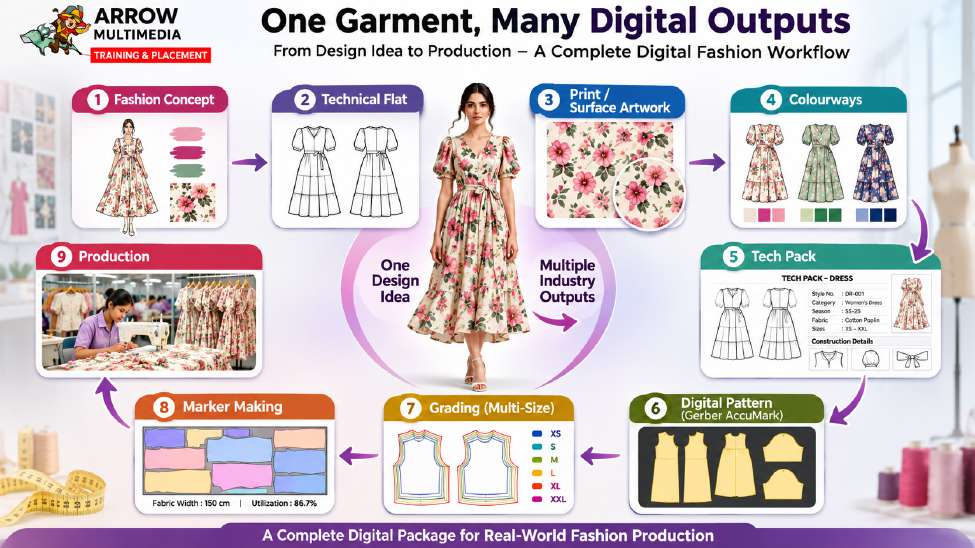
Consider a simple shirt. A designer may draw it with a collar, sleeves, buttons, pockets, a print and a particular colour. That sketch communicates the concept. But the industry may need several different digital outputs from that one idea. The same garment can become:
- Fashion IllustrationCommunicates the creative concept.
- Technical FlatCommunicates construction and garment details.
- Vector ArtworkCommunicates clean, scalable artwork.
- Textile PrintCommunicates the surface design.
- ColourwayCommunicates alternative colour options.
- Tech PackCommunicates specifications and production information.
- Digital PatternCommunicates the actual pattern structure.
- Graded PatternCommunicates multiple sizes.
- MarkerCommunicates fabric placement and cutting efficiency.
This is the transformation from idea to production. The student does not simply learn how to make something visually attractive. The student learns how that design travels through the industry.
From One Idea to Multiple Industry Outputs
One of the most important concepts in this course is understanding that a fashion design does not exist as a single image. It becomes a collection of connected digital assets.
Each stage has a different purpose. Each stage may involve a different person or department. Each stage may require a different file format. And each stage must communicate accurately with the next. This is why digital fashion professionals need to understand not only software, but also workflow.
Why Photoshop Matters in Fashion
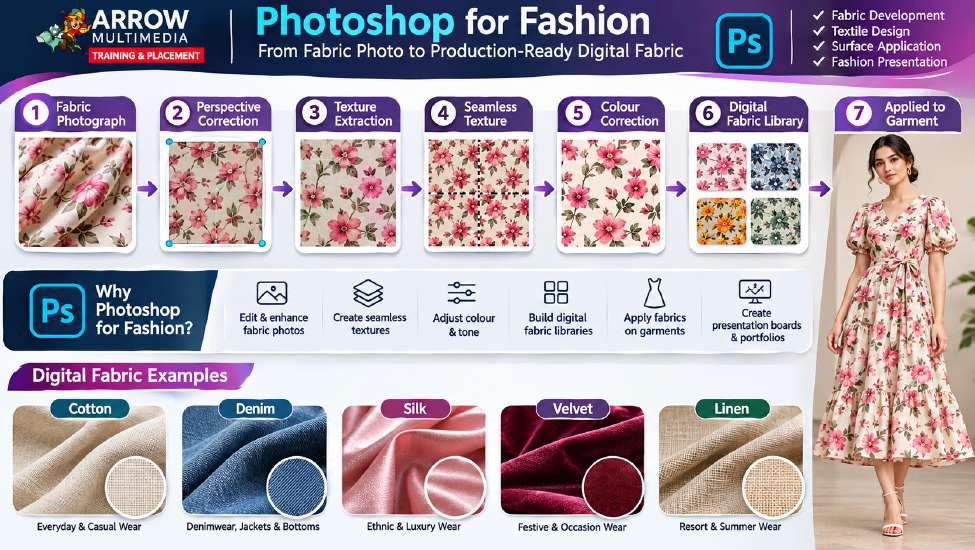
Adobe Photoshop is not simply a photo-editing software. In digital fashion workflows, it can become a powerful tool for developing and presenting visual fashion assets. Students can use Photoshop for:
- Fabric texture development
- Fabric image cleanup
- Seamless textures
- Digital fabric libraries
- Colour correction
- Textile visualization
- Print development
- Garment mockups
- Surface applications
- Presentation boards
- Fashion portfolio development
- Image manipulation
- Digital presentation
Imagine photographing a piece of fabric. The photograph may contain perspective distortion, uneven lighting, background noise, shadows, colour variations and unwanted objects. The designer can digitally process that fabric and convert it into a usable digital texture, which can then be applied to a garment visualisation.
That is much more powerful than simply showing a fabric photograph.
Illustrator: From Fashion Ideas to Precise Vector Communication
Where Photoshop is powerful for raster-based visual development, Illustrator is particularly valuable for vector-based fashion artwork and technical communication. Students learn to create:
- Vector motifs
- Textile artwork
- Repeat patterns
- Technical flats
- Garment details
- Colourways
- Placement graphics
- Borders
- Logos
- Labels
- Production artwork
- Print-ready artwork
Vector graphics can be scaled without losing their sharpness. A small motif can become a large print. A garment drawing can be edited precisely. A technical flat can be modified. A design can be separated into components. This is where the student begins to move from creative drawing toward controlled digital design.
Technical Flats: The Drawing That Speaks to the Industry
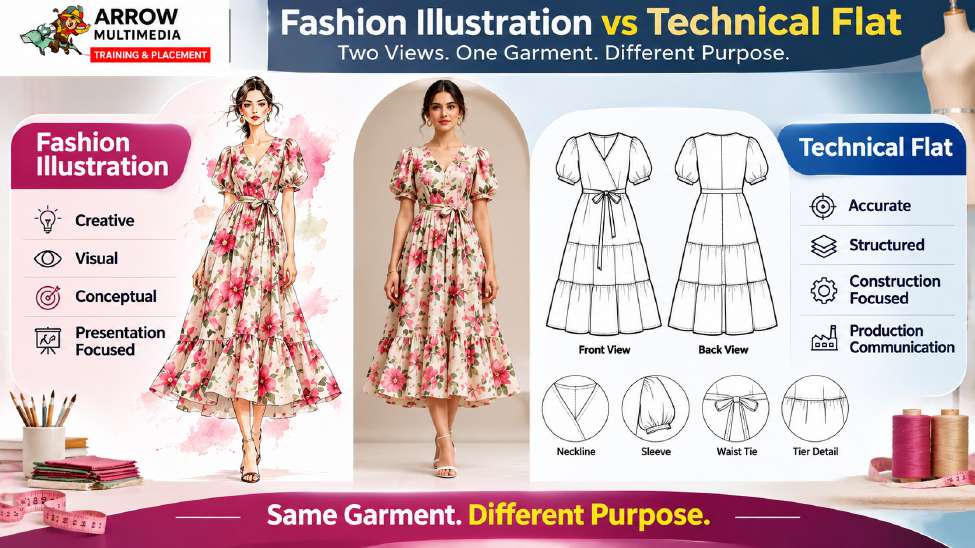
One of the most important outputs in digital fashion is the technical flat. A fashion illustration communicates how a garment looks. A technical flat communicates how the garment is constructed. It may show:
- Front view
- Back view
- Collar
- Sleeves
- Pockets
- Seams
- Stitching
- Closures
- Hems
- Panels
- Construction details
The purpose is not artistic beauty. The purpose is clarity and accuracy. A technical designer, production team, merchandiser, sample room or manufacturer should be able to understand the garment from the drawing. This is why technical flats are one of the important bridges between design and production.
Textile Design: From Motif to Repeat to Garment
A textile designer does not simply create a beautiful motif. The motif must work as a textile. That means understanding:
- Repeat size
- Scale
- Direction
- Spacing
- Colourways
- Placement
- Fabric application
- Print limitations
- Production requirements
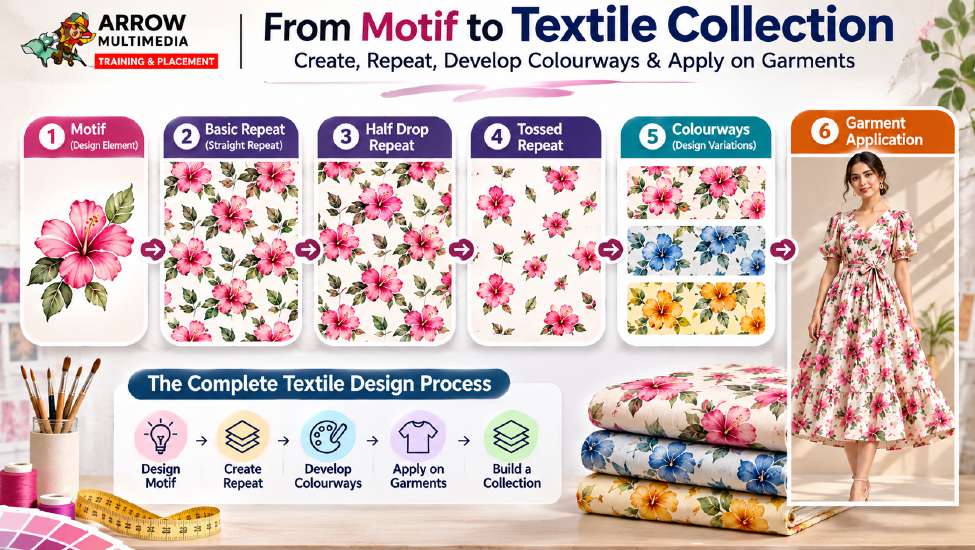
A flower motif, for example, can become:
Different repeat systems can produce completely different visual results. Students learn to develop repeat structures such as:
- Basic repeat
- Half drop
- Full drop
- Brick
- Mirror
- Tossed
- Stripe
- Plaid / check
- Geometric repeats
The important learning outcome is not simply knowing a software command. It is understanding why a particular repeat structure is selected and how it behaves on fabric and garments.
Colourways: Turning One Design into a Collection
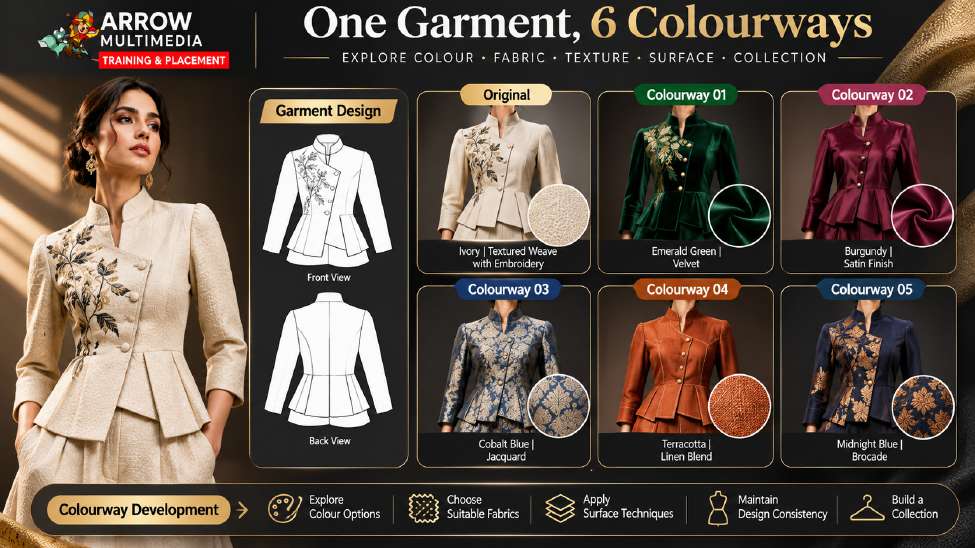
A professional fashion collection rarely stops with one colour. A single garment may be developed into multiple colourways based on:
- Season
- Customer segment
- Brand identity
- Market preference
- Fabric availability
- Trend direction
- Collection theme
Digital tools make this process much faster and more controlled. Students learn to create multiple colourways while maintaining design consistency, colour relationships, surface artwork, fabric appearance and product identity.
This becomes another important portfolio skill. Instead of showing one garment, the student can demonstrate:
Tech Packs: Where Design Becomes Production Information
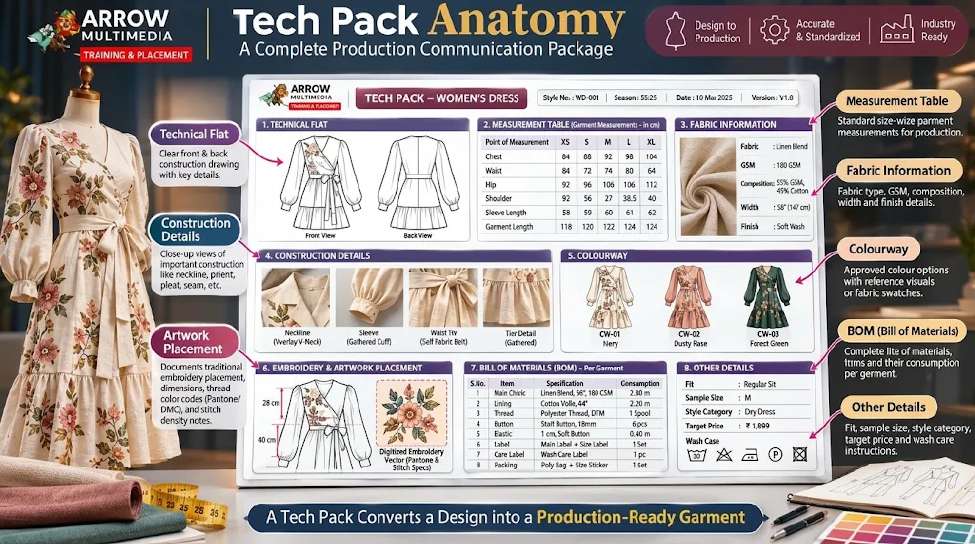
One of the biggest differences between a student project and an industry-oriented project is documentation. A designer may create an excellent garment. But how does the production team know exactly what to make? This is where the tech pack becomes important. A tech pack can include:
- Style number
- Product name
- Season
- Technical flats
- Fabric information
- Colour information
- Trims
- Construction details
- Measurements
- Points of measurement
- Tolerances
- Bill of materials
- Labels
- Buttons
- Zippers
- Thread
- Packaging information
- Artwork placement
- Production notes
The student therefore learns that fashion design is not only about creating the garment. It is also about documenting the garment.
The Role of Gerber AccuMark: From Digital Drawing to Digital Pattern
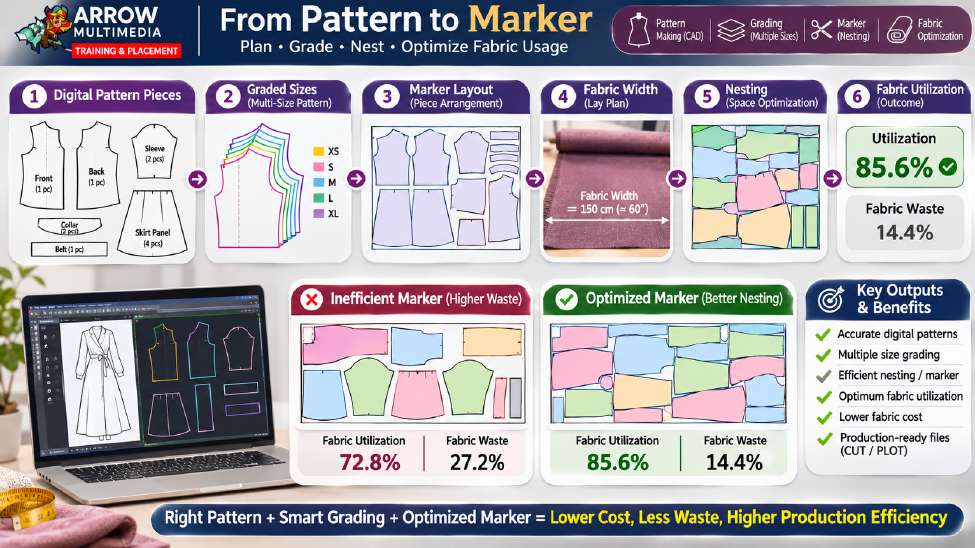
Technical flats communicate garment construction. But a garment also needs a pattern. This is where fashion CAD becomes important. In the course, Gerber AccuMark is used as the primary fashion CAD platform for learning:
- Digital pattern development
- Pattern editing
- Seam allowances
- Notches
- Grainlines
- Internal lines
- Drill holes
- Pattern identification
- Pattern organization
- Pattern engineering
- Grading
- Marker making
The student begins to understand that a pattern is not simply a shape. It represents the engineering behind the garment. The digital pattern becomes a bridge between design intent and physical garment production.
Grading: From One Size to a Size Range
A garment designed in one base size is not enough for commercial production. The design may need to be developed into a size range:
Grading involves controlled size development based on defined grade rules and points. Students learn base size, grade points, horizontal grading, vertical grading, size increments and multi-size pattern development. This is an important transition from design thinking to production thinking.
Marker Making: Connecting Pattern to Fabric Efficiency
After grading, another important question appears: how can these pattern pieces be arranged efficiently on fabric? This is where marker making becomes important. The student learns concepts such as:
- Fabric width
- Grain direction
- Pattern placement
- Rotation
- Nesting
- Marker length
- Utilization
- Fabric consumption
This introduces the student to the commercial reality of fashion production. A good design is important. But production also has to consider:
This is where digital fashion education becomes closely connected with the production environment.
Where Does AI Fit Into Digital Fashion?
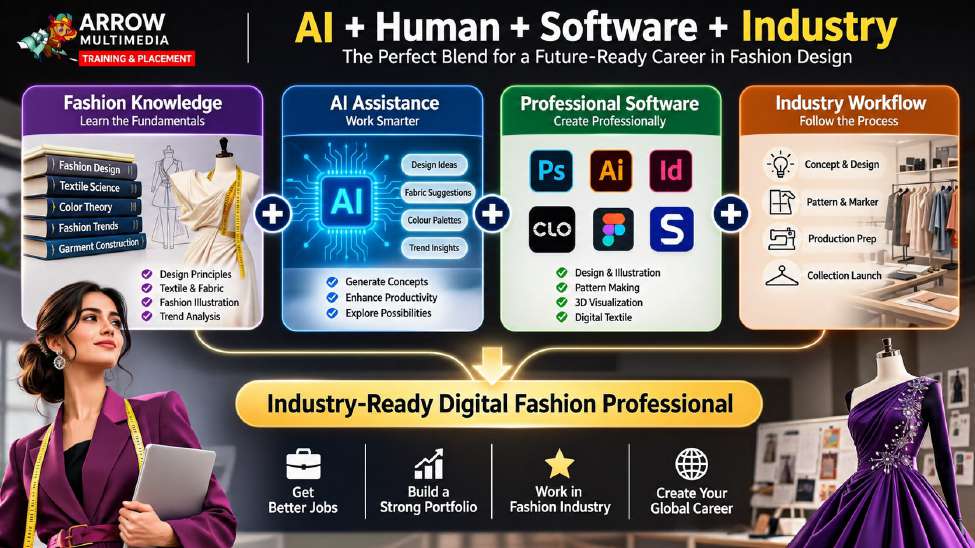
AI is changing almost every creative industry, including fashion. But AI should not be treated as a replacement for fashion knowledge. It should be treated as an accelerator and creative assistant. AI can support areas such as:
- Inspiration generation
- Moodboard development
- Concept exploration
- Trend research
- Colour exploration
- Print ideas
- Visual references
- Creative variations
- Presentation concepts
- Portfolio storytelling
- Image enhancement
- Background generation
- Early-stage ideation
However, an AI-generated image is not automatically a production-ready fashion design. There is a major difference between:
AI Inspiration
Attractive garment images, ideas and references.
Production Artwork
What the industry actually needs to make the garment.
An AI tool may generate an attractive garment image. But the industry may still require:
- Accurate technical flats
- Correct proportions
- Vector artwork
- Repeat patterns
- Measurements
- Construction information
- Tech packs
- Digital patterns
- Grading
- Production files
Therefore, the course teaches students to understand AI as part of the modern workflow, not as a replacement for professional design skills. The ideal workflow becomes:
That combination is much more powerful than any one tool by itself.
Building a Portfolio That Shows Capability, Not Just Creativity
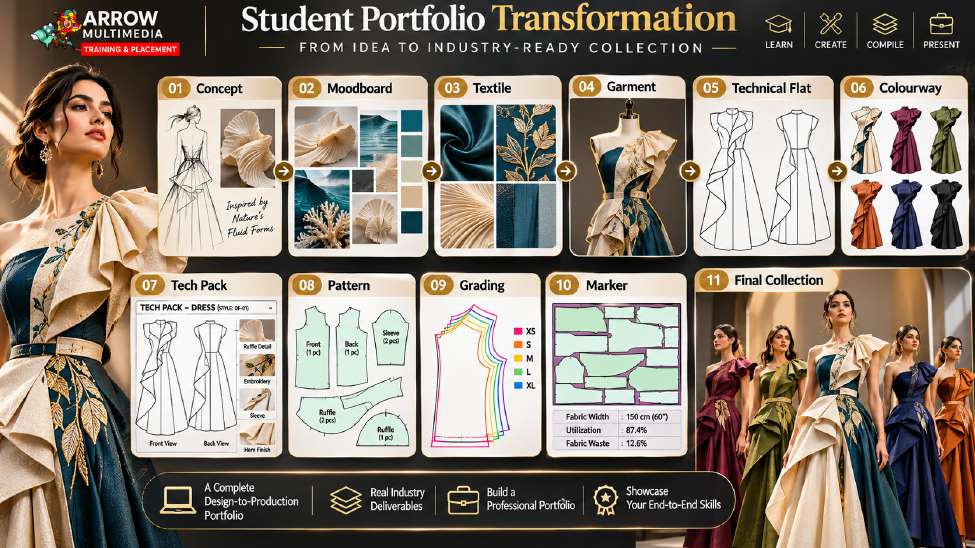
A modern fashion portfolio should answer a simple question: “What can you actually do?” Instead of presenting only beautiful fashion illustrations, students should demonstrate the complete digital journey. A strong portfolio can include:
- 01 — Collection ConceptWhat is the design story?
- 02 — MoodboardWhat is the visual direction?
- 03 — Colour BoardWhat is the colour strategy?
- 04 — Fabric BoardWhat materials support the collection?
- 05 — Textile DevelopmentHow were the prints developed?
- 06 — Garment CollectionWhat are the final designs?
- 07 — Technical FlatsCan the designs be communicated technically?
- 08 — ColourwaysCan the design be developed commercially?
- 09 — Tech PackCan the design be documented?
- 10 — CAD PatternCan the garment be developed digitally?
- 11 — GradingCan the design move across sizes?
- 12 — MarkerCan the pattern move toward production?
This portfolio tells a much stronger story than a collection of disconnected images. It demonstrates process, technical understanding and production awareness.
What Exactly Does the Student Learn?
The course is designed around five major digital capability areas.
Design
Students digitally develop fashion concepts. Photoshop and Illustrator help transform ideas into professional visual assets.
Vector
Scalable and editable artwork, including motifs, prints, technical flats, logos, labels and production artwork.
Surface & Application
How designs are applied to fabrics and garments.
- Prints & repeats
- Colourways
- Placement artwork & borders
- Embroidery & appliqué concepts
Pattern
Digital pattern development using fashion CAD, connecting garment design with garment engineering.
Production
How the complete digital package moves toward production.
- Tech packs & BOM
- Grading & marker making
- Fabric utilization
- File organization
- Production documentation
Together, these five areas create a much more complete professional profile.
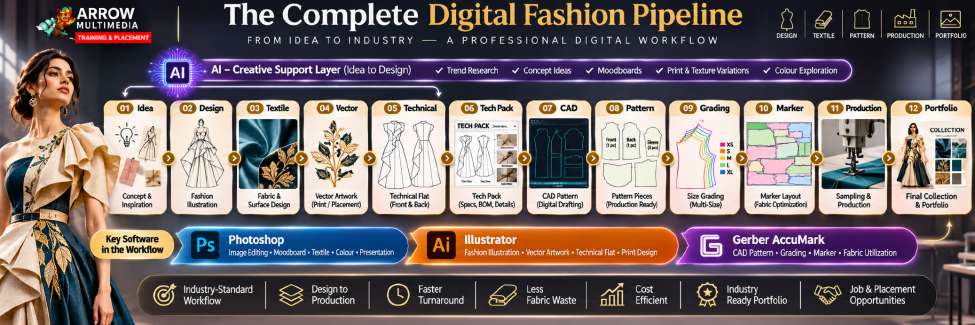
The Digital Fashion Workflow Students Experience
The entire course can be understood through one simple workflow:
This is the journey from creative idea to industry communication.
Who Is This Course Actually For?
Instead, it is built specifically for students and professionals who already have strong traditional and manual skills, such as hand sketching, colouring, draping, garment making, or intricate surface design, and want to learn how to convert that physical work into digital, production-ready assets. It is particularly suitable for:
- Graduates or students of Fashion Designing, Apparel Designing, Textile Designing, Fashion Technology, or Garment Technology
- Surface ornamentation specialists and embellishment designers who want to digitize hand-drawn motifs into clean vector files, repeat patterns, and precise placement specs
- Students from traditional institutes (such as NIFT, JD, Lakmé, or equivalent programs) who are strong in creative studio work but weak in digital software presentation
- Anyone who has completed a six-month or one-year traditional fashion program and wants to become job-ready for export houses, buying houses, and modern design studios
- Working professionals with traditional industry experience who need to upgrade to modern CAD and digital workflows
What Will the Student Produce During the Course?
The strongest proof of a course is not the syllabus. It is the output. During the program, students work toward tangible outputs such as:
- Digital fabric library
- Seamless textures
- Textile motifs
- Repeat patterns
- Textile print collections
- Garment applications
- Vector artwork
- Technical flats
- Garment colourways
- Surface applications
- Tech packs
- BOM
- Production artwork
- Digital patterns
- Graded patterns
- Markers
- Production documentation
- Professional portfolio
The final objective is not simply “I learned Photoshop.” It is:
That is a much more meaningful career outcome.
The Bigger Career Picture
The fashion industry contains many different roles. A digitally skilled fashion professional can explore opportunities in areas such as:
- Digital Fashion Design
- Textile Design
- Surface Design
- Print Design
- Technical Design
- Fashion CAD
- CAD Pattern Development
- Pattern Engineering
- Production Artwork
- Apparel Graphics
- Fashion Product Development
- Tech Pack Development
- Fashion E-commerce Design
- Digital Fashion Presentation
- 3D Fashion Design (after advanced training)
The objective is not to make every student a master of every role. The objective is to help students understand how these roles connect. That understanding can make a significant difference when entering the industry.
Traditional Fashion Knowledge + Digital Skills = Stronger Professional Profile
Traditional fashion education is not outdated. It provides the foundation. Students still need to understand fashion, fabric, garment, colour, silhouette, construction, pattern and design. But modern industry increasingly expects professionals to communicate these ideas digitally. Therefore, the future is not Traditional vs Digital. It is:
And increasingly:
Why Arrow Multimedia?
The philosophy behind the program is simple. We do not want students to learn software as isolated subjects. Instead:
Every tool has a purpose. Photoshop is not taught simply because it is Photoshop. Illustrator is not taught simply because it is Illustrator. Gerber is not taught simply because it is CAD software. Each tool is introduced because it solves a particular problem in the fashion workflow. The student therefore learns not only “Which tool should I use?” but also:
That mindset is at the heart of digital fashion education.
The Final Goal: From Student to Industry-Ready Digital Fashion Professional
At the beginning of a traditional learning journey, a student may say “I can design fashion.” After completing a digitally focused, industry-oriented program, the goal is for the student to confidently say:
“I can take a fashion concept, develop digital artwork, create textile designs, prepare technical flats, create colourways, document the garment through a tech pack, develop digital patterns, grade them, prepare markers and present the complete project professionally.”
That is a completely different level of capability. It is the difference between knowing fashion and knowing how fashion moves through a digital industry workflow.
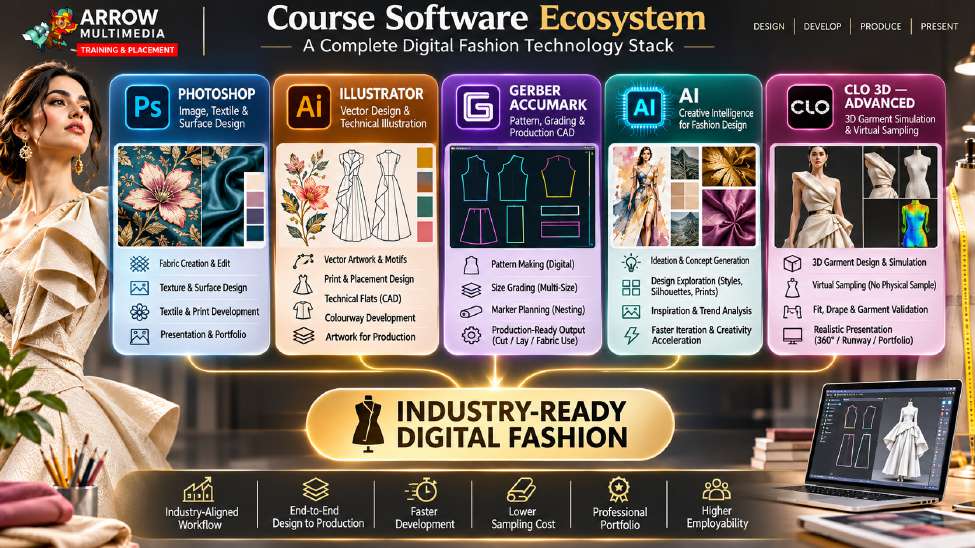
The Digital Fashion Design & Production Program
Industry-Oriented Digitalization Program for Fashion Designers
PHOTOSHOP
Fabric + Texture + Textile + Presentation. Digital textile, fabric, texture, garment application and presentation.
ILLUSTRATOR
Vector + Print + Technical Flat + Colourway + Artwork. Motifs, repeats, technical flats, colourways and production artwork.
GERBER ACCUMARK
Pattern + Grading + Marker + Production. Digital pattern development, grading and marker making.
AI
Ideation + Exploration + Inspiration + Acceleration.
CLO 3D • ADVANCED
3D Garment + Virtual Sampling + Fit + Presentation. After the core program, students can progress into advanced 3D garment development, virtual sampling, fit visualization and digital fashion presentation.
Conclusion
Fashion will always begin with creativity. But in the modern fashion industry, creativity must also be communicated, documented, developed and produced. A beautiful idea is only the beginning. The professional journey continues through:
That is the gap between simply learning fashion and understanding how fashion operates digitally within the industry. The purpose of Digital Fashion Design & Production at Arrow Multimedia is to build that bridge. It is designed for students who already understand fashion and want to understand what comes next.
Not another beginner fashion course. Not simply another software course. Not just an illustration program. Instead, it is a structured journey from fashion knowledge to digital fashion communication and production readiness. The student learns how to convert ideas into digital assets: how motifs become repeat patterns, fabrics become digital textures, garments become technical flats, designs become colourways, artwork becomes production information, designs become digital patterns, patterns become graded sizes and markers, and finally how all of these outputs become a professional portfolio that demonstrates real capability.
Because the future fashion professional is not only a designer. The future fashion professional is someone who understands how design moves through technology, communication and production.
Ready to Bridge the Gap?
Are you a fashion graduate ready to bridge the gap between creative design and industry production? Join the upcoming batch of the Digital Fashion Design & Production Programme at Arrow Multimedia.
Enquire About the Next BatchFrom Creative Idea to Industry-Ready Digital Output.
